
Avast Cleanup – Phone Cleaner
Avast SoftwareTools
4.636.42K Reviews
- Version
- 26.12.2
- Installs
- 50.00M
- Age Rating
- Everyone
Screenshots
Our Review of Avast Cleanup – Phone Cleaner
 Analysis by Appyee
When a phone starts warning me that storage is nearly full, I try to find out what is taking up space before deleting anything important. Avast Cleanup – Phone Cleaner is built for that kind of hands-on maintenance: it brings cleanup and device-management tools together in one place, so I can review possible actions instead of hunting through settings and folders. I find it most useful as a guide to what might be worth clearing, rather than as a magic button that can fix every slowdown.
A practical routine for cleaning up
My first step with a cleaner app is to look at the results before approving a cleanup. Temporary files may be safe to remove, but a broad storage recommendation deserves a closer look, especially when a phone contains offline downloads, work documents, or files I have not backed up. That small pause turns cleanup into a deliberate routine instead of a reflex.
A useful pattern is to run a scan when I notice a real problem, such as a low-storage warning or trouble saving a video, and then inspect the suggestions one by one. If the space issue is mainly photos, I focus on the photo tools; if cached or leftover files are the larger opportunity, I look at the junk-cleaning results. I would not expect either route to solve a battery fault or a weak network connection, since those are different problems.
That distinction matters because cleaning storage and making a phone feel faster are related only sometimes. A nearly full device may have less room for downloads and updates, but deleting files does not guarantee that every app will open more quickly. I treat any speed improvement as a possible benefit, not a promise, and judge the app by whether it helps me make safer, clearer storage decisions.
First Impressions
When I first downloaded the Avast Cleanup – Phone Cleaner, I wasn't quite sure what to expect. I mean, there are a ton of cleaner apps out there claiming to do the same thing. But right off the bat, the user interface caught my eye. It's clean, intuitive, and super easy to navigate. No clutter, just straightforward options to get your phone running smoothly.
That straightforward layout is helpful for someone who does not want to learn a complicated file-management system. I still recommend taking a moment to read what a suggested action will affect before tapping a cleanup control. A clear interface makes navigation easier, but it does not remove the user's responsibility to decide whether a file or photo is expendable.
Features That Stand Out
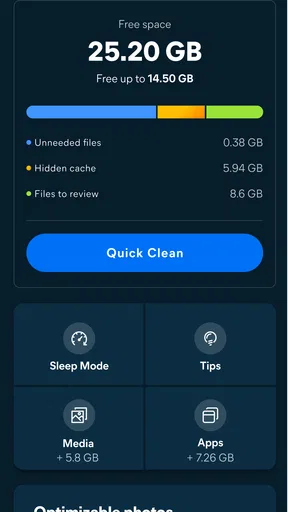
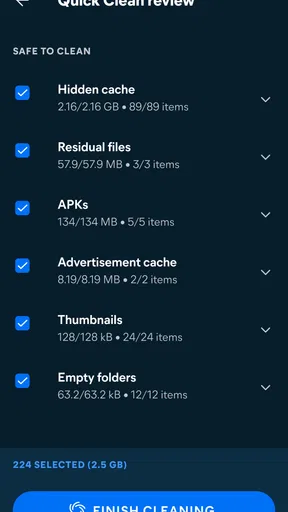
Alright, let’s talk features. This app is packed with functionalities that are more than just fluff. One of the coolest features is the Junk Cleaner. It scans your device for unnecessary files, cache, and other digital debris. Seriously, you’d be surprised at how much junk your phone accumulates over time!
I would use the scan as a prompt to review storage rather than assuming every item it finds should go. Cache can be recreated, but the immediate effect of clearing it may be that an app has to load or download some material again. If I am about to travel or expect to be offline, I would avoid clearing anything that might make maps, media, or other frequently used content less convenient until I have checked what is stored locally.
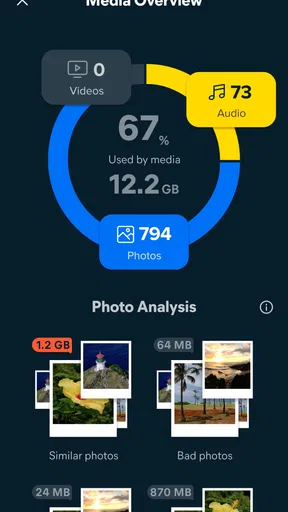
The photo review is a different kind of cleanup, because the cost of a mistaken choice can be more personal than losing temporary data. Similar-looking pictures are not always duplicates: one may be a sharper version, or contain a detail I want to keep. I would review groups carefully, retain the best image, and make sure valuable photos are backed up before deleting anything. That extra attention is especially worthwhile when clearing a large camera roll in a hurry.
Another highlight is the Photo Optimizer. It helps manage your photos by identifying similar photos, poor quality shots, and even blurry images. The app gives you options to delete or optimize them, freeing up valuable space. Who doesn’t need more room for new memories, right?
Photo cleanup is most useful when I have accumulated a lot of near-identical shots from a day out or an event. Rather than approving a whole batch quickly, I would check whether the suggested image is genuinely the one I no longer need. If I am already short on space, doing this review before recording more video can be more useful than repeatedly deleting a few files after each warning.
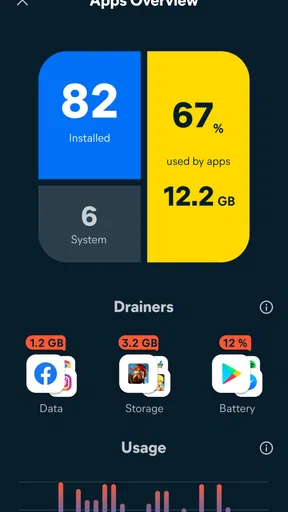
Then there's the Battery Saver. If you're like me and constantly running low on juice, this feature is a lifesaver. It provides insights into what's draining your battery and offers ways to extend your phone's life between charges.
Battery advice is most useful as a starting point for investigation. If a particular app is consuming power, I would also look at how often I use it, whether it needs background activity, and whether my screen settings fit the day ahead. A cleaner can surface a concern, but I would not expect it to replace the phone's own battery controls or fix an aging battery. On a long day away from a charger, reducing screen use may matter more than running a cleanup.
Performance Boost
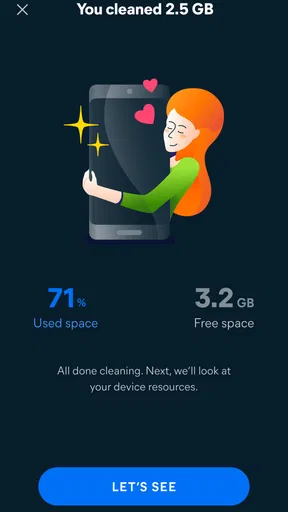
Now, on to how it actually performs. After running the cleanup for the first time, I noticed my phone was significantly faster. Apps loaded quicker, and the overall responsiveness was much better. It’s like giving your phone a spa day. Seriously, who doesn’t love a little pampering?
My practical advice is to compare how the phone behaves before and after a cleanup under similar conditions. If the same app remains slow, I would check for an update, restart the phone, or investigate that app directly rather than running repeated scans. That helps separate a storage issue from a problem that needs a different fix, and it keeps maintenance from becoming busywork.
In addition to speed, the app also offers a Device Manager feature that provides a comprehensive overview of your phone’s status. It shows RAM usage, storage status, and other vital stats, helping you keep an eye on your phone’s health in real time.
For an everyday routine, I find a quick look at storage more actionable than checking device indicators constantly. For example, before a weekend trip I might review free space, decide whether old downloads can go, and check whether I have room for the photos and videos I expect to take. That is a specific job with a clear endpoint; repeatedly monitoring status without a decision to make is less useful.
Settings and habits that make it more useful
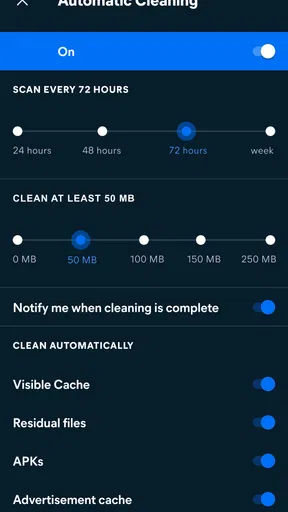
It is worth checking the app’s notification and reminder settings early. Maintenance prompts can help if I tend to forget about storage, but frequent nudges can become noise when my phone is working normally. I prefer reminders that fit a real habit, such as reviewing space occasionally, rather than treating every alert as a reason to clean immediately.
I also keep the phone’s built-in storage tools in the picture. They are a sensible comparison point when I want to confirm which apps or files are using space, while Avast Cleanup offers a consolidated place to review its own cleanup suggestions and related tools. If I am unsure what a recommendation refers to, checking the device’s own storage view before acting gives me another perspective.
For anyone who shares a device or uses it for work, the safest habit is to avoid bulk decisions when distracted. I would review suggested photos and files when I have time, not while rushing to free space before an appointment. A cleaner is most helpful when I can weigh convenience against the chance of removing something I later need.
Faster patterns for everyday use
A realistic example: I am leaving for a trip, my phone is low on space, and I still want room for pictures. I would first check what is occupying storage, then review the photo suggestions carefully, and finally remove only files I recognize and no longer need. I would avoid deleting offline material that I plan to use on the journey. This sequence is more reliable than tapping every suggested action just to make the warning disappear.
For a phone that fills up repeatedly, I would look for the source of the pattern instead of making cleanup a daily chore. A large photo library, saved media, or apps that keep data locally may call for a different habit: periodically moving or removing content I have finished with. The cleaner can help me notice opportunities, but it cannot decide which memories, downloads, or documents matter to me.
This is also where the app differs from relying only on manual settings. The built-in tools are a straightforward option when I want to inspect storage directly; Avast Cleanup brings several maintenance areas into one app and can make the review feel more guided. I would choose the simpler built-in route if I only need to delete one known file, and use the app when I want a broader check without manually exploring each area.
Limits, value, and who should use it
Avast Cleanup is a free tools app from Avast Software, with optional in-app purchases. The free starting point makes it easy to try the basic workflow, but I would decide whether any paid option is useful only after seeing which tools I actually return to. In-app purchase prices range from under a dollar to just under sixty dollars per item, so I would check the current purchase details carefully before confirming anything.
The app has a 4.6 average from around 1.5 million ratings, and it has been installed over 50 million times. Those figures suggest that many people have tried it, but they do not tell me whether it suits my particular phone or habits. It is rated for Everyone, first released on February 27, 2015, and its current version is 26.03.0, with Android 10 as the minimum operating-system requirement.
I think it is a good fit for someone who wants a guided way to review storage, especially if photo clutter and recurring space warnings are part of everyday phone use. It is less compelling for someone who already knows how to manage files through the phone’s settings and prefers not to install another maintenance app. I would also skip it if I expect a cleaner to repair a damaged battery, fix a faulty app, or deliver a guaranteed speed increase; those expectations go beyond what a cleanup routine can reasonably do.
Is it Worth It?
So, you’re probably wondering if it’s worth downloading. Well, for anyone dealing with a sluggish phone, I’d say it’s a must-try. The basic version is free, but there’s a premium option that unlocks even more features. It’s a small price to pay for maintaining your phone’s health, if you ask me.
Plus, it’s not just about the cleanup. The app provides regular notifications and reminders to keep your phone in check. It’s like having a personal assistant for your device.
Final Thoughts
In conclusion, Avast Cleanup – Phone Cleaner is more than just a simple cleaner. It’s a comprehensive tool to maintain and improve your phone’s performance. Whether you’re tech-savvy or not, this app makes it easy to keep your device in top shape.
So, if your phone’s been running like molasses, give this app a whirl. You’ll be surprised at the difference it can make. And hey, if it’s not your cup of tea, it’s easy to uninstall. But something tells me you won't want to once you see the improvement.
Verdict
Strengths of Avast Cleanup – Phone Cleaner
- Intuitive interface, easy to navigate.
- Boosts phone performance significantly.
- Customizable cleaning options.
- Regular updates enhance functionality.
- Comprehensive junk file removal.
Limitations of Avast Cleanup – Phone Cleaner
- Free version has limited features.
- Some ads in the free version.
- Occasional false positives on files.
- Advanced features require subscription.
- May drain battery during scans.
Other Releases by Avast Software
View All
Avast One: Antivirus, Security
Tools4.6

Avast SecureLine VPN & Privacy
Communication4.3
Similar Picks in This Category
View All
Google LLC4.0

Gboard - the Google Keyboard
Google LLC4.5

Google Play services
Google LLC4.3

Google Play Store
Google LLC4.9

Files by Google
Google LLC4.5

SHAREit: Transfer, Share Files
Smart Media4U Technology Pte.Ltd.4.3
Frequently Asked Questions
What features does Avast Cleanup offer for optimizing my phone?
Avast Cleanup provides a range of features including junk file removal, photo optimization, and app hibernation. It also offers a battery saver and a tool to clean up RAM. The app helps in managing storage space by identifying large files and duplicate photos, ensuring your phone runs smoothly.
Is Avast Cleanup safe to use on my Android or iOS device?
Yes, Avast Cleanup is designed with safety in mind. Developed by Avast, a trusted name in cybersecurity, the app ensures your personal data remains secure while optimizing your device. It performs non-intrusive cleaning processes and provides users with full control over what files to delete.
How does Avast Cleanup improve my device's performance?
Avast Cleanup enhances device performance by clearing unnecessary files, optimizing photo storage, and stopping resource-draining apps. By doing so, it frees up RAM and storage space, making your device faster and more efficient. The app also extends battery life through smart management features.
Are there any costs associated with using Avast Cleanup?
Avast Cleanup offers a free version with basic features. However, for advanced tools like deep cleaning and automatic maintenance, users can opt for a premium subscription. The premium version offers more comprehensive cleaning options and additional features to enhance your device's performance.
Can Avast Cleanup help extend my phone's battery life?
Yes, Avast Cleanup includes a battery saver feature that identifies and stops apps running in the background. By managing these apps, it reduces battery drain, helping to extend the overall battery life of your device. This feature is particularly useful for users who experience quick battery depletion.
